For instructors planning to use Blackboard
updated 31 January 2006- If you are
unfamiliar with Blackboard, consider attending an
introductory workshop for faculty. The workshop schedule
for early spring may be found on the Lehman web site at the following
address:
http://www.lehman.edu/docs/bbsp2006.html.
A tentative schedule of Blackboard sessions for March and April may be
found at: http://www.lehman.edu/faculty/john/workshops/marapr06.html
- If
the schedule is not convenient or if you anticipate special
problems, contact John Dono at (718) 960-8338 or via email at john@lehman.cuny.edu.
- Consider bringing your class
to the Information Technology Center for
an orientation to Blackboard. You can reserve an IT Center
classroom through
Jean Warfel in the Office of the Registrar at (718) 960-8254. If
you would like an IT Center staff
member to conduct the orientation, contact Valerie Henderson of ITR at
(718) 960-8698 or via email at Valerie.Henderson@lehman.cuny.edu.
- ITR offers workshops for
students on a variety of topics including the CUNY
Portal, Lehman Email, and Microsoft Word. Direct your students to
the following web page for the schedule and other details: http://www.lehman.edu/training
- In order to use Blackboard, you and your
students must register on the CUNY
Portal - a web-based
application that provides for single sign-on to Blackboard, centralized
library resources, eSIMS and other CUNY services. To register on
the portal, go to http://www.cuny.edu.
At the completion of the portal registration process, you will have an
active portal userid and password. For information on the portal
registration process see the following document:
http://www.lehman.edu/docs/portalinfo.pdf
If you or your students are unable to successfully complete the portal registration, please refer to the document above for further information or contact the IT Center Help Desk in 108 Carman Hall. You can reach the Help Desk by telephone (718 960-1111), via email at helpdesk@lehman.cuny.edu or you can visit in person when the IT Center is opened. The IT Center is opened seven days a week when classes are in session. Click here for IT Center hours.
Help Desk staff can assist in the portal registration process, look up forgotten portal userids and will refer problems to full-time staff if necessary. Most portal access problems should be resolved within 48 hours.
If you forgot your portal password you can request that a new password be sent to your Lehman College email address. Help Desk staff will look up your Lehman email address and reset the email password if necessary to enable you to retrieve your portal password.
- To access Blackboard, login to the CUNY
Portal at http://www.cuny.edu after
you have
completed your registration. In the event the portal home page is
not available, registered portal users can login directly to Blackboard
via the Blackboard
"sidedoor" at http://blackboard-doorway.cuny.edu
by entering their portal username and password in the text boxes.
- In the event you or your students do not
have a valid active portal
username and password, you can still access Blackboard via the
Blackboard
"sidedoor" at http://blackboard-doorway.cuny.edu.
This might be necessary if a student is not able to register or not
able to request a reset of a password because the portal is unstable or
unavailable.
To gain access to Blackboard without a portal username and password, click on the word "here" on the sidedoor page:
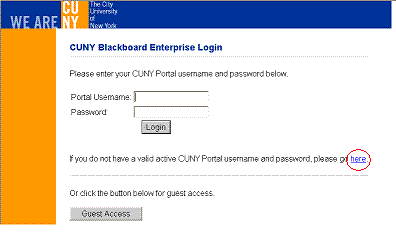
The student will be prompted to enter personal information including last name, date of birth and social security number. This method of accessing Blackboard should only be used when registration or a password reset is temporarily blocked. For this to work current students must enter information that matches their records in SIMS and active staff and faculty must enter information that matches their records in the City University Personnel System (CUPS). This will not help in those cases where students are not officially registered in a class, where a faculty appointment is not yet active in CUPS or when a descrepancy exists between the data in CUPS or SIMS and what the user is entering.
- A Blackboard course is
automatically created for
every credit-bearing
College course that appears in SIMS. There is usually no need to
request
that your credit-bearing course be created on Blackboard. If you
need a course created that is not in SIMS, please contact John Dono
(john@lehman.cuny.edu) or
Jerry Barnard (jerry@lehman.cuny.edu).
- You should confirm as soon as possible that the
information regarding
your Blackboard course
assignments and course enrollments is correct.
Your Blackboard courses appear under "Courses you are teaching" on your "My Institution" Page (your opening Blackboard page). A typical course id looks like this:
LC_LEH_300_ONAW1_200602
Pay particular attention to the semester identifier (year and month) that appears at the end of the course code. "200602" indicates a spring 2006 course.
Instructors are automatically assigned to Blackboard courses based on data in the Student Information Management System (SIMS). If your teaching assignments have not been entered into SIMS, you will not see the course listed on Blackboard. There are a variety of reasons why this might happen, e.g. adjunct and new full-time appointments are sometimes delayed, you may have been assigned the class late etc. If you do not see a course listed which you plan to teach with Blackboard, check with the chair of your department that the Registrar's Office has been notified of your teaching assignment. If it is not feasible to adjust the teaching assignment in SIMS on a timely basis, please contact John Dono (john@lehman.cuny.edu) or Jerry Barnard (jerold.barnard@lehman.cuny.edu).
- You should also check that all the students on your
official roster are
enrolled in your
Blackboard course. In the Control Panel of your Blackboard
course, click on List/Modify Users,
then on Search. A list
of all students enrolled in your course should display. Students
are automatically enrolled in their Blackboard courses based on data in
SIMS. This list will change daily at the beginning of the
semester as students add and drop courses.
- To the extent that the
completion of registration is
delayed as sometimes happens with students in special programs (e.g.
union-funded programs, Teaching Fellows), students may be enrolled in
your Blackboard course at the start of the semester. Instructors
of
courses of this type should first check with program
coordinators to see if this is likely to be a problem. If so,
contact John Dono (john@lehman.cuny.edu)
or Jerry
Barnard (jerold.barnard@lehman.cuny.edu)
as soon as possible for advice on how
to proceed. If you find a few students on your official
roster missing from
your Blackboard course, direct them to the IT Center Help Desk (718
960-1111 or helpdesk@lehman.cuny.edu).
You may also enroll existing Lehman College students yourself through
the Control Panel of the Blackboard course. Select Enroll Users
in the User Management area.
- New courses are set to "unavailable" by default, that
is, they are
unavailable to your students and will not appear on their opening
Blackboard pages. You as the instructor will see (unavailable) next to the course id
on your main Blackboard page. The unavailable setting is the most
common reason for students reporting to the IT Help Desk that they are
not in their Blackboard courses. Instructors are able to enter
and work on a course that is unavailable to students. When you
are ready to
have your students enter the course, go to Control Panel > Course
Settings > Course Availability to change the setting from No
to Yes.
- Lehman College email addresses are used within
Blackboard in almost all
cases. These
are email addresses with the following format:
firstname.lastname@lehman.cuny.edu
Email addresses within Blackboard cannot be changed. These email addresses are displayed when you select List/Modify Users in the Control Panel. If you send mail to students in your class from within Blackboard, the mail will be sent to the student's Lehman College email address. If a student sends mail to you from within Blackboard, it will go to your Lehman College email address. For information on Lehman College email, http://www.lehman.edu/docs/mirapoint/lcmirapoint.html
Regardless of your use of email within Blackboard, it is critical that Blackboard users be familiar with Lehman College email. Reset portal passwords are generally sent via email to Lehman College email addresses and the username portion of the email address (firstname.lastname) and associated password controls access to the Lehman Library's electronic resources from off-campus and to the wireless network.
- In addition to verifying the accuracy and completeness of the Blackboard course assignments and enrollments, we strongly recommend that you confirm as early in the semester as possible your students ability to enter your Blackboard course and perform simple tasks such as participation in a discussion and retrieval of documents. This is especially important in courses that will be taught entirely online.
Send comments on this document to john@lehman.cuny.edu.