






Activating Your Lehman Login Account


Objective:

This article guides users through the process of successfully activating their Lehman Login Account. During this process users will:

  1. Be provided with their Lehman Login Username (firstname.lastname)
  2. Be able to create their Lehman Login Password
  3. Configure three required Multi-Factor Authentication (MFA) methods

What is a Lehman Login Account?

The Lehman Login Account refers to the unique set of credentials (username and password) assigned to students, faculty, and staff for accessing local Lehman-specific systems and services. This account is separate from the CUNY Login Account* and is used to access a limited number of Lehman resources such as campus computers, Lehman Wi-Fi, and a few others where specified.

*Most of the systems available to students, faculty, and staff use the CUNY Login Account.

Note:

  • The Username format for some users may contain one or two digits appended to the last name (firstname.lastnameX or firstname.lastnameXX)

For Student Only:

  • The “password” set-up during the Lehman Login Account activation, is the same password to be used when logging in to the student email account.


Must Read Before You Proceed:

To activate a Lehman Login Account, users must have an active record in CUNYfirst:

  1. Students must be officially admitted and have an active student record in CUNYfirst for at least 2 business days before accessing this system.
  2. Faculty and staff must have an active employment record in CUNYfirst for at least 2 business days following the employment start date entered by HR before they can access this system.

Account activation will not be possible until CUNYfirst reflects the appropriate active status for each population.

PROCEDURE

From your preferred browser, go to the self-service Lehman Login Account Manager (URL: https://managelogin.lehman.edu/).

On the Manage Your Account (Existing & New Users) section, click on New User? Activate Your Lehman Login Account.
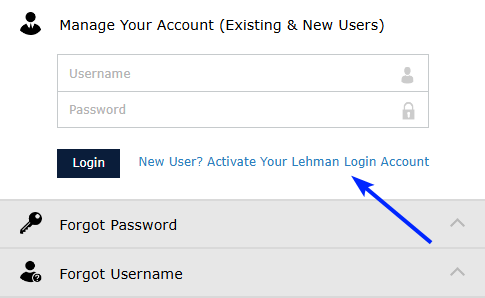
Activating Your Lehman Login Account - step2

Complete your Personal Information questions and click on Continue.

Notes:

  • Your personal information must match exactly with the information in your CUNYfirst record
  • If your CUNYfirst personal information is incorrect, it must first be corrected in CUNYfirst. Please allow 24 hours after the correction performed in CUNYfirst before accessing this system again.
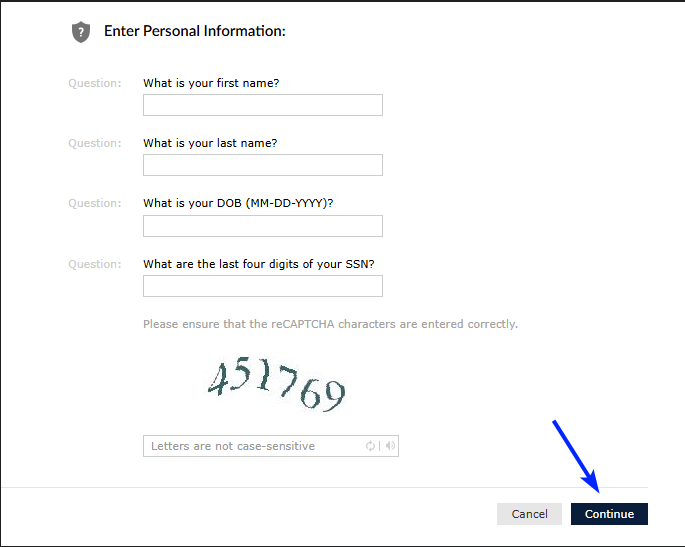
Activating Your Lehman Login Account - step3

Next, you will need to set up three factors:

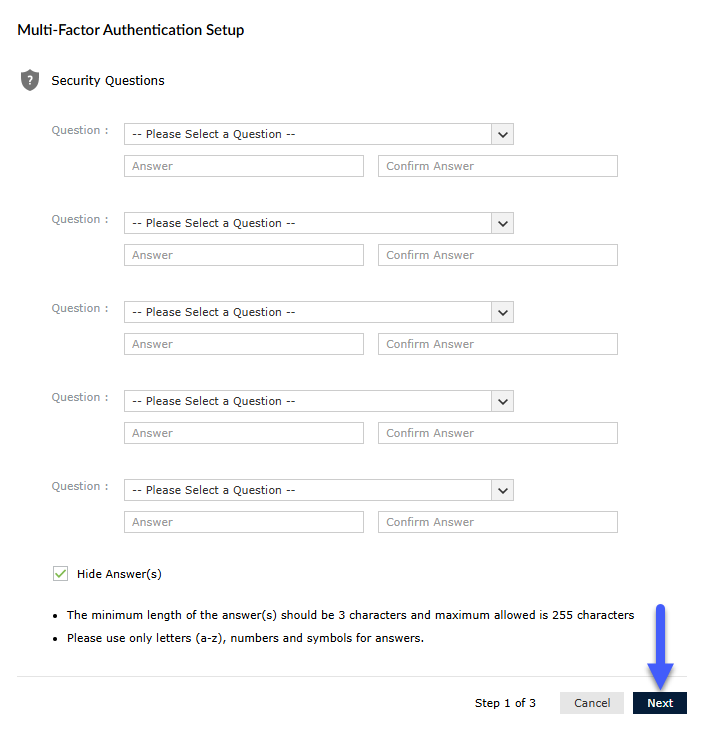
  • Security Questions
  • A Recovery Email
  • Authenticator App

Security Questions

Set up five (5) Security Questions, and click on Next.

Activating Your Lehman Login Account - step 4

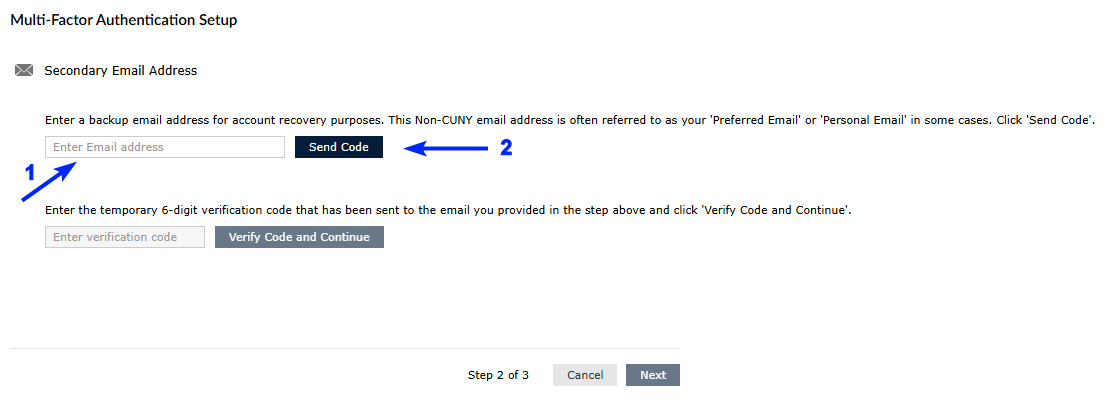
Secondary (Recovery) Email

Enter a Secondary Email Address for account recovery purposes, and click on Send Code.

Activating Your Lehman Login Account - step 5

Important:

  • Do not list your Lehman email address as your secondary email. Instead, provide an alternate email that you can access in case you're unable to log into your Lehman account.
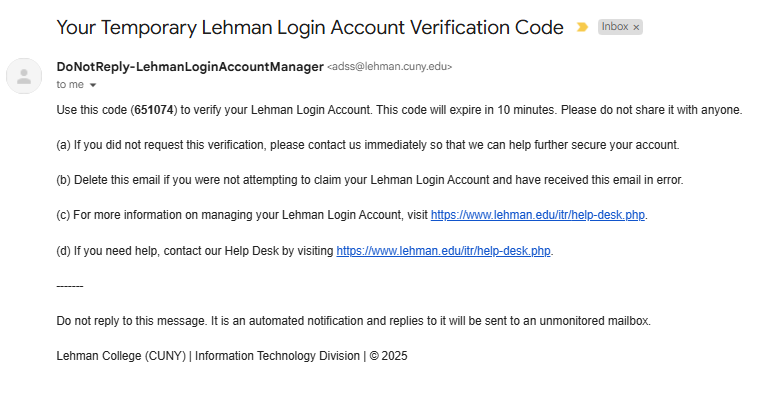
  • Check the inbox of the secondary email address you just provided. Locate the message containing the verification code.

Note: The code provided will expire within 10 minutes. You will need to re-send a new code if the first one has already expired.

Email Details:
Sender: DoNotReply-LehmanLoginAccountManager (adss@lehman.cuny.edu)
Subject: Your Temporary Lehman Login Account Verification Code
Sample Email:

Activating Your Lehman Login Account - step 5a

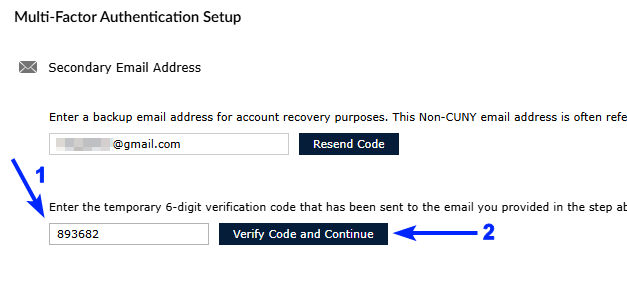
Return to the system, enter the code in the appropriate field, and click on Verify Code and Continue.

Activating Your Lehman Login Account - step 6

Authenticator App

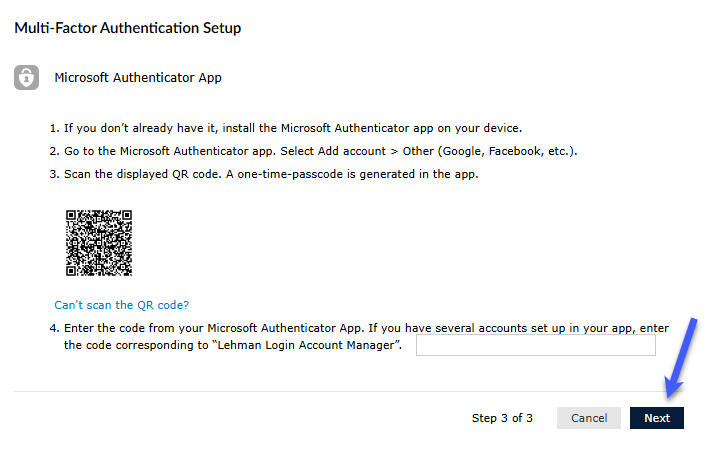
To set up Multi-Factor Authentication, follow the instructions presented to install the Microsoft Authenticator App on your mobile device.

Activating Your Lehman Login Account - step 7

Direct Microsoft Authenticator App Installation Links:

  1. Apple Devices
  2. Android Devices

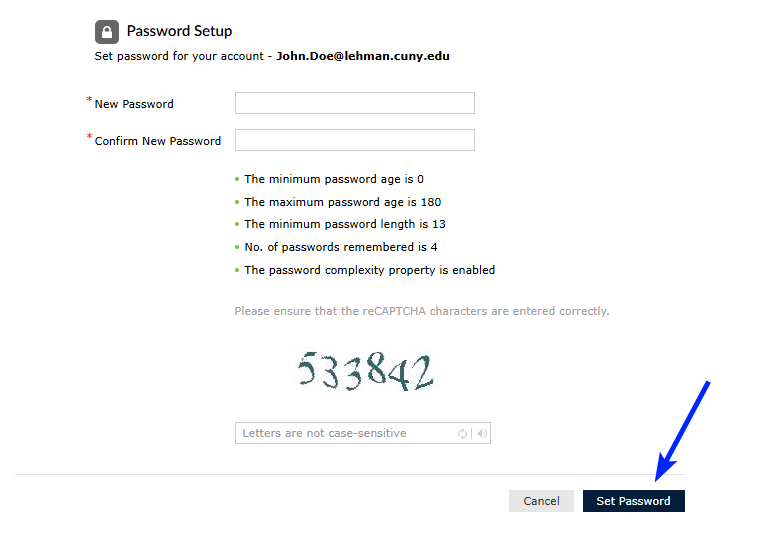
Create a password for your account. Then, click on Set Password. Make sure your password complies with the password guidelines displayed.

Activating Your Lehman Login Account - step 8

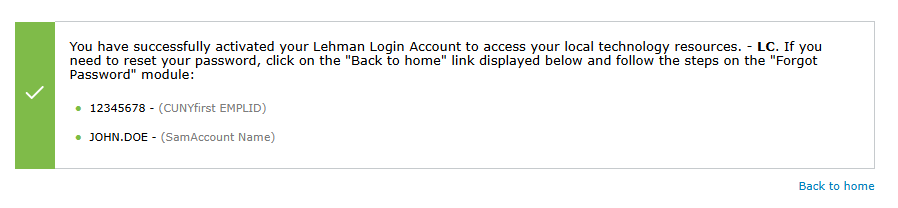
You have now successfully activated your Lehman Login Account. You can now use your new Lehman Login Account credentials where applicable.

Activating Your Lehman Login Account - step 9

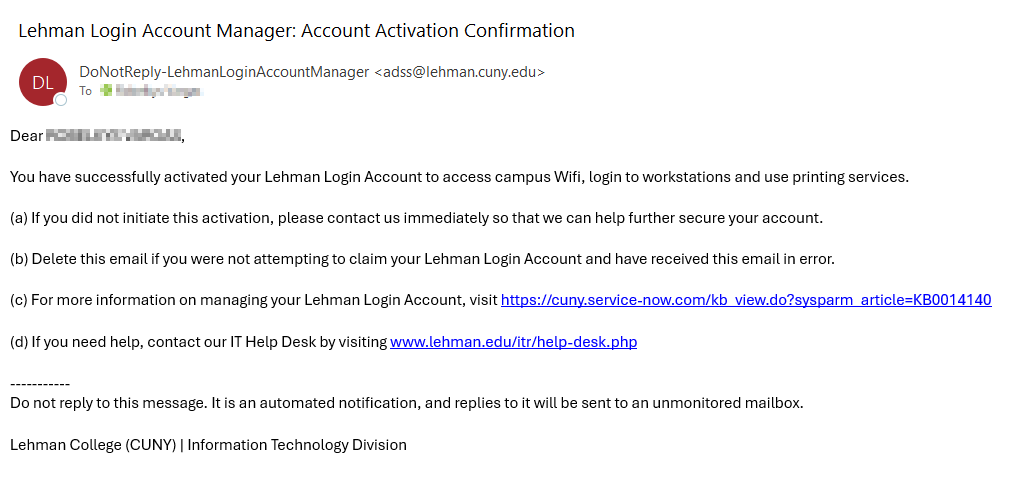
In addition, you will also receive an Account Activation Confirmation email as the following sample:

Email Details:
Sender: DoNotReply-LehmanLoginAccountManager (adss@lehman.cuny.edu)
Subject: Lehman Login Account Manager: Account Activation Confirmation

Activating Your Lehman Login Account - step 9a