Share
Share




Technology Self-Service Hub
Welcome to the Technology Self-Service Hub - your one-stop destination for quick access to IT tools, guides, and resources. Here you can reset passwords, manage your accounts, find step-by-step instructions, and explore solutions to common technology issues-anytime, anywhere.
CUNY Login MFA Message
When logging into CUNYfirst, Brightspace, Navigate, Lehman 360, or any other system with your CUNY Login Account credentials, you may encounter the following message:
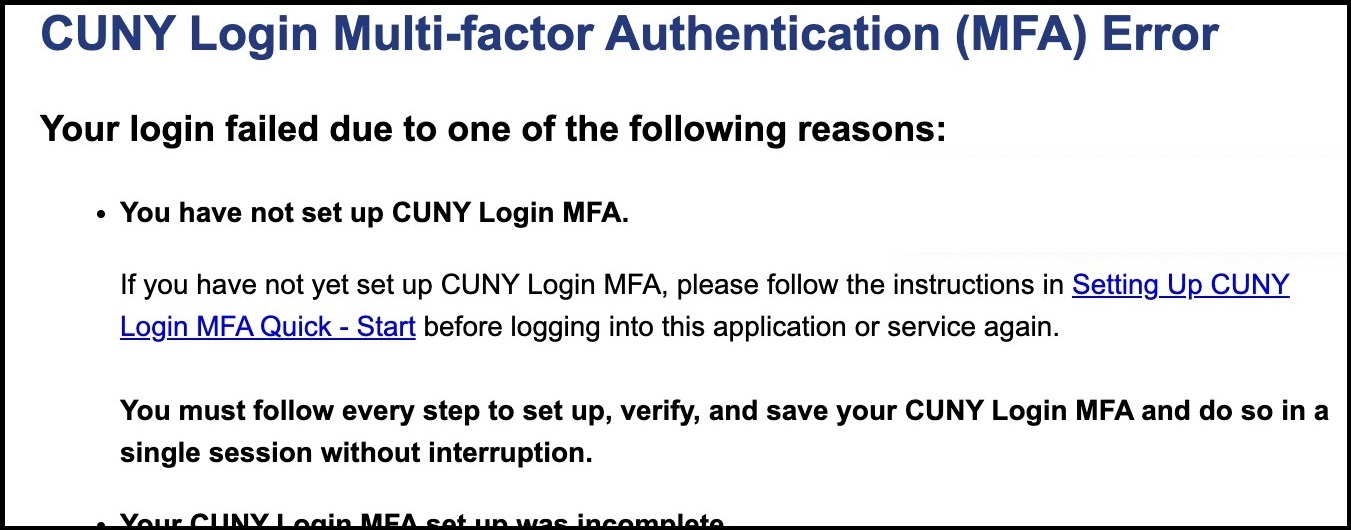
Here is what you need to do:
(A) If you have not previously initiated the CUNY Login MFA setup:
- Click here to follow the step-by-step instructions.
- Check out this quick video and follow along with the steps (YouTube).
(B) If you started setting up your CUNY Login MFA but did not complete the process or experienced technical issues, please use the Lehman Virtual Q at lehman.edu/q to schedule an appointment. Be aware that wait times may be longer than usual due to higher support volumes.
Wi-Fi
Tips:
- Your Wi-Fi uses the same credentials as your Lehman Login Account
- Your Lehman Login Account usually looks like "firstname.lastname". In some cases, a number (s) may be added at the end, such as "firstname.lastname2", when multiple users have similar names."
- Your Lehman Login Account is NOT the same as your CUNY Login Account.
(A) If you need your Wi-Fi credentials (AKA "Lehman Login Account") use the self-service Lehman Login Account Manager as follows:
- click here to claim your Lehman Login Account if you are using this system for the first time.
- click here to reset your password if you have used this system before but do not remember your username and/or password.
(B) If you already know your Lehman Login credentials and can access Wi-Fi, but need help connecting your device, choose from the options below:
- Instructions for Androids
- Instructions for iPhones
- Instructions for MacBooks
- Instructions for Windows 10 Operating System
- Instructions for Windows 11 Operating System
(C) If options A or B did not work, please use the Lehman Virtual Q at lehman.edu/q to schedule an appointment. Be aware that wait times may be longer than usual due to higher support volumes.
Student Email
- You access your new email using your CUNY Login Account (firstname.lastname##@login.cuny.edu) via Microsoft Outlook.
- Use the same username and password you already use for CUNYfirst, Navigate, and others listed on the Login page
- For more information go to Student Email and Microsoft 365 Apps