







Office of Digital Inclusion (ODI) - FAQs
The Office of Digital Inclusion (ODI) supports Lehman College students with access to loaner technology for academic use. Requests are made through WebCheckout and depend on eligibility and available inventory.
Requesting a Device
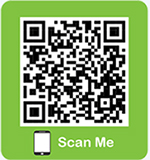
Submit your request through WebCheckout. Scan the ODI-branded QR code below to access WebCheckout, the ODI’s reservation system.
]
ODI may offer loaner technology such as Chromebooks, and iPads. Availability may change based on inventory.
Loaner devices are intended for actively registered Lehman College students who need technology for Lehman-related educational purposes.
Using Your Device
Use the equipment for Lehman College–related academic work. The device remains Lehman College property throughout the loan period.
Do not modify the device’s appearance, attempt repairs, or disable system or security updates. Avoid installing software unless ODI has approved it.
Do not rely on local storage. Loaner devices may be wiped after they are returned. Save your work to OneDrive, Dropbox, email, a flash drive, or another secure cloud or external-storage location.
Sign out of personal accounts and applications, save any files stored locally, and turn off the device before returning it.
Problems and responsibility
Do not attempt to repair it yourself. Create an appointment with ODI for support services by using the LehmanQ.
Please email ODI office for lost or stolen equipment.
digital.inclusion@lehman.cuny.edu. Lost or stolen devices must also be reported to Public Safety (contact Public Safety at 718-960-8228).
Return the device by the date and time listed on your WebCheckout reservation record. You are required to return it immediately if requested, if you withdraw from classes, or if you are no longer an actively registered Lehman College student.
If you are returning a device earlier than your reservation date, please schedule your return using the LehmanQ.
Schedule and return all loaned equipment and supplied accessories to:
Office of Digital Inclusion
Carman Hall, Plaza Level, Room 140
250 Bedford Park Boulevard West
Bronx, NY 10468
Submit an extension request through WebCheckout or contact ODI digital.inclusion@lehman.cuny.edu before your listed return deadline.
Extensions depend on eligibility, current need, and device availability.
No additional signature is required after the device is picked up.
When a student reserves a device through WebCheckout using their college registration/login, the student’s electronic registration serves as their electronic acknowledgment and legal signature confirming that they agree to the applicable device loan terms and responsibilities.
Contact Office of Digital Inclusion |
||
|---|---|---|
Need |
What to Do |
|
| Request a Device |  |
Scan the ODI-branded QR code and submit a request through WebCheckout. |
| Request an Extension |
|
Submit an extension request through WebCheckout before the due date. |
| Report a Device Issue | |
Contact ODI digital.inclusion@lehman.cuny.edu or schedule an appointment using the LehmanQ. |
| Return a Device | |
Schedule your return and bring it to Carman Hall, Room 140. |
| Report Loss or Theft | Contact ODI digital.inclusion@lehman.cuny.edu and Public Safety at 718-960-8228. | |